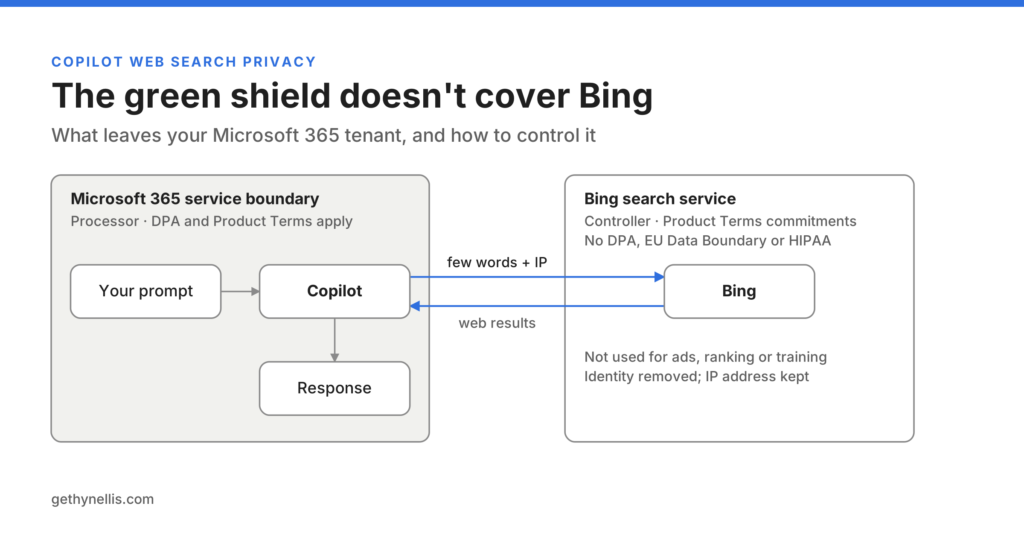
Every few weeks someone asks me whether their organisation should have web search switched on in Copilot Chat. The question usually comes from a security or data protection lead, and it usually arrives with a worry they can’t quite pin down: something about Bing, something about PII, and a suspicion that the green shield isn’t telling them the whole story.
They’re right to be suspicious. Copilot web search privacy is the one area where Microsoft 365 Copilot does send data outside the service boundary you assessed, and most tenants have it switched on by default without ever having made that decision. This post explains what actually leaves, what Microsoft commits to, where the documentation goes quiet, and what I’d do about it. Every claim links to Microsoft’s own page so your governance team can check my working.
My take, up front: leave it on for most people, switch it off by policy for the roles that handle named individuals, default it to off in every agent you publish, and put a Purview DLP policy underneath all of it. The rest of this post is why.
What the green shield does and doesn’t mean
The green shield in Copilot Chat means enterprise data protection applies. Microsoft is clear that prompts and responses stay inside the Microsoft 365 service boundary, covered by the Data Protection Addendum and the Product Terms, with Microsoft acting as your processor. That part is true and it’s the part people remember.
What they miss is that when Copilot grounds an answer in web content, it calls the Bing search service, and Bing operates separately from Microsoft 365 with different data-handling practices. For that part of the interaction Microsoft is a controller, not a processor. Different legal box, different terms, different answers in your DPIA.
So the two sides of the usual argument are both partly right. Microsoft isn’t passing your prompt straight to public Bing. It also isn’t keeping the whole thing inside the tenant. The detail is in what gets sent and under which terms.
How Copilot web search actually works
Copilot doesn’t forward your prompt to Bing. It reads the prompt, decides whether web content would improve the answer, and if so generates a short search query of a few words derived from the prompt. That query goes to Bing. Bing returns results, and Copilot composes the response using those results alongside your Microsoft 365 data.
Microsoft is specific about what is not in that generated query: the full prompt (unless it’s very short, the documented example being “local weather”), entire Microsoft 365 files or uploaded files, and any identifying information from the user’s Entra ID such as username, domain or tenant ID.
Two things are sent that tend to get overlooked. The user’s client IP address goes with every request so Bing can localise results. And when someone is prompting inside Word with a document open, or explicitly references a document, the query can be informed by that document’s content. The file doesn’t leave. A theme or term extracted from it can.
Microsoft’s own worked examples make this concrete. Ask Copilot to compare an internal clean energy strategy with a competitor’s public position, and the query “Fabrikam clean energy policy announcements” goes to Bing. Ask who your manager is and what public information exists about them, and your manager’s name goes to Bing. The prompt stays. The name, or the strategic theme, doesn’t.
That’s the whole issue in one sentence. Copilot decides which terms cross the boundary, and the user has no say in which ones.
What Microsoft commits to on the Bing side
The commitments on the generated query are stronger than consumer Bing and weaker than the rest of Microsoft 365. Both halves of that sentence matter.
The Copilot section of the Product Terms commits that generated queries aren’t used to improve Bing, train foundation models, build advertising profiles or track behaviour; aren’t shared with advertisers; are treated as customer confidential information; and give Microsoft no rights beyond what’s needed to run the service. The Australian government blueprint adds that they aren’t stored in the Bing index and aren’t reachable through Webmaster tools or any partner tooling. That’s a materially better position than typing the same words into bing.com.
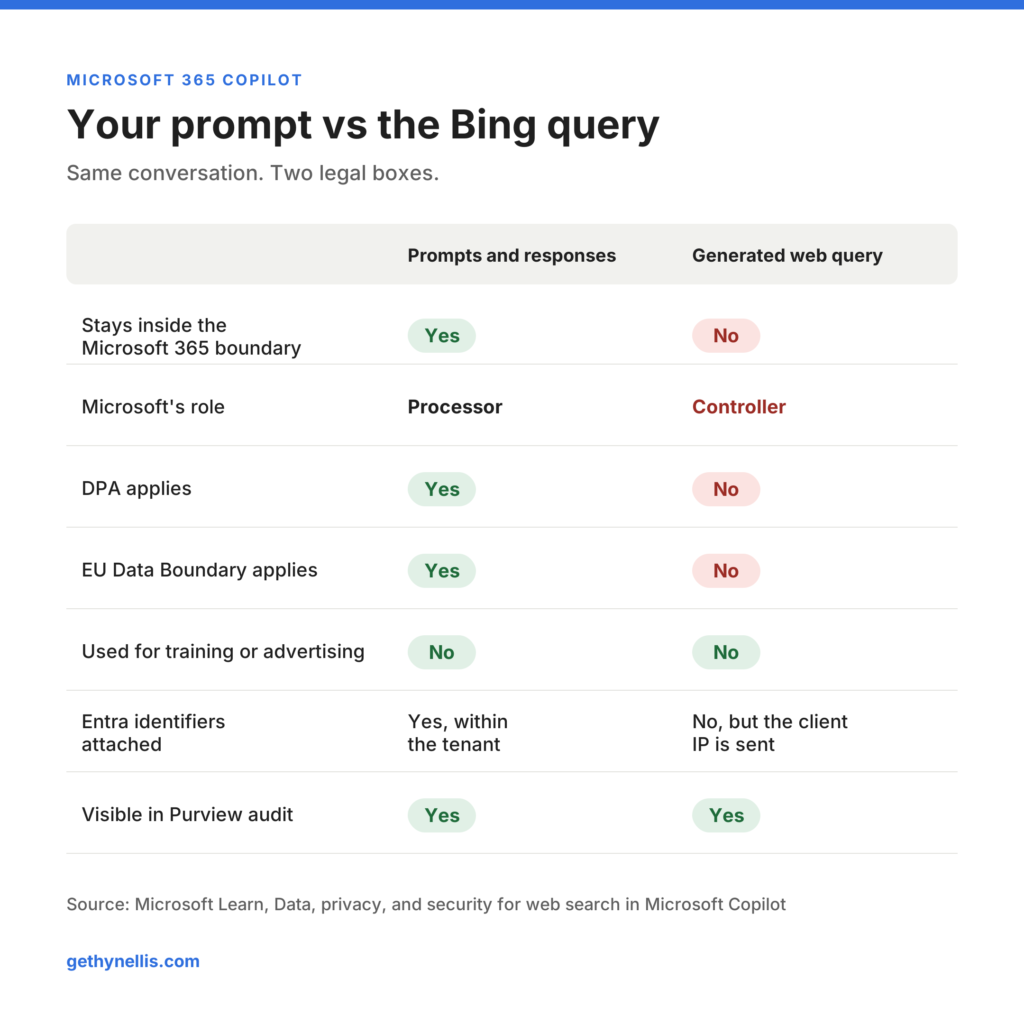
Now the other half. The same Microsoft page states plainly that for web queries the Data Protection Addendum does not apply, the EU Data Boundary does not apply, HIPAA does not apply, and Microsoft acts as an independent controller under the Services Agreement and Privacy Statement, with the Product Terms winning where they conflict. The enterprise data protection page describes this as consistent with other optional connected experiences that rely on Bing. That’s accurate, and it’s also the point: web grounding is a connected experience with its own terms, bolted onto a service most organisations assessed on the assumption that the DPA covered everything.
| Prompts and responses | Generated web query | |
|---|---|---|
| Stays inside the Microsoft 365 boundary | Yes | No |
| Microsoft’s role | Processor | Controller |
| DPA applies | Yes | No |
| EU Data Boundary applies | Yes | No |
| Used for training or advertising | No | No |
| Entra identifiers attached | Yes, within the tenant | No, but the client IP is sent |
| Visible in Purview audit | Yes | Yes |
What the documentation won’t tell you
Three questions a data protection officer will ask aren’t answered anywhere on Microsoft Learn that I can find, and you should expect to answer them with assumptions rather than facts.
Who at Microsoft can access the query strings, and under what controls? The Product Terms say “appropriate technical and organisational measures”, which is the standard GDPR phrase and tells you nothing about scope. How long does Bing retain the queries? The documentation covers what they aren’t used for, not how long they exist, and the Privacy Statement that governs them is written for consumers. Where are they processed? The EU Data Boundary explicitly doesn’t apply, so UK organisations relying on adequacy for Microsoft 365 need to treat the web query path as a separate transfer and document it as one.
None of this makes the risk high. For most people the generated query is a handful of words about a public company, a product or a topic. The risk sits in a different legal box from the rest of Copilot, and most DPIAs written before web grounding was understood don’t have that box in them.
The practical exposure is narrower and sharper. If a solicitor asks Copilot in Word whether the counterparty in an open contract has been in the news, the counterparty’s name leaves the tenant. If an HR lead asks about a named employee’s professional background, that name leaves. The user can see the exact query afterwards in the citation panel, but only in Copilot Chat and only for 24 hours.
The four controls, and why most tenants use one
The Allow web search in Copilot policy in Cloud Policy service for Microsoft 365 is the primary control and the one everyone knows about. It scopes to users or groups and has three settings: enabled everywhere, disabled everywhere, or disabled in Work mode but enabled in Web mode and Copilot Chat. If you’ve never configured it, web search is on. Be aware that the third option also switches off web search in Researcher and Cowork.
The control almost nobody has deployed is DLP. A Purview DLP policy targeting the Microsoft 365 Copilot and Copilot Chat location can, when a prompt contains a configured sensitive information type, prevent Copilot from performing a web search for that prompt while still answering from internal data. That’s selective blocking by content rather than a blanket switch, and it catches the case a persona-based policy misses: the finance analyst who pastes an account number into an otherwise harmless question. UK national insurance numbers, NHS numbers, financial identifiers and your own custom SITs can all drive it.
Third, admins can exclude up to 1,000 sites from web grounding by PowerShell. That governs what Copilot reads rather than what it sends, but it’s useful where specific sites are a known source of poor content.
Fourth, and most often skipped, is the per-agent setting. Declarative agents declare web search as a capability in their manifest, optionally scoped to four named sites. Agent Builder has a Web content toggle under Knowledge. Copilot Studio has its own Bing grounding terms and a control in the Power Platform admin centre. The tenant policy overrides all of them: disable it at tenant level and agents with web search enabled silently stop using it, while the Agent Builder toggle stays visible but does nothing.
Users also get a Web content toggle that persists across sessions. It’s a real control, but it relies on someone remembering to switch it off before a sensitive conversation, and that isn’t a control you can evidence to an auditor.
On the audit side, every generated query is logged and searchable in the Purview audit log and eDiscovery, and shown next to the prompt and response in DSPM for AI activity explorer. You can see exactly what crossed the boundary. After the fact, but you can see it.
Decide three times, not once
A single tenant-wide yes or no is the wrong shape of decision. Web grounding is what makes Copilot Chat useful for research, competitor analysis and anything that happened after the model was trained. Turn it off everywhere and you trade a bounded privacy risk for a diffuse productivity loss nobody will ever report. Turn it on everywhere and your safeguarding team gets the same posture as your marketing team.
The tenant default
Does the organisation accept a controller-governed Bing query as the baseline? For most, yes, with DLP as the backstop. That’s the honest position for an organisation that wants the productivity and has read the terms.
Persona exceptions
Which roles routinely type names, case references or regulated identifiers into prompts? HR, legal, clinical, safeguarding and finance are the usual answer. Scope the Cloud Policy to those groups and switch web search off for them. They lose little and you remove the sharpest exposure.
Every agent you publish
Does this agent need live web content to do its job? Usually not. An agent built to answer questions about an internal policy library has no reason to search the web, and leaving the capability on means every prompt to it is a candidate for a Bing query. Make the Web content toggle a required field in whatever approval process governs agent publishing, and default it to off.
Mitigations that stack
No single control covers this. Five of them together give you something you can defend. Deploy the Purview DLP policy with the web search prevention action. Keep sensitivity labels mature, because labelled and encrypted content is handled conservatively by Copilot’s grounding and a confidential document’s themes are less likely to become search terms. Enable Copilot auditing and review a monthly sample of generated queries in DSPM for AI; it’s cheap, and it’s the most persuasive evidence you’ll have in a governance review because it shows what happened rather than what the policy says.
Give users one sentence of guidance, not a 40-page acceptable use policy: “Web search is on. Copilot may send a few words from your prompt to Bing, so start a new chat with web content off before discussing named people or client matters.” And add a DPIA addendum that records the web query path as a separate processing activity with Microsoft as controller, the Services Agreement and Product Terms as the governing documents, client IP and derived terms as the data categories, and the DPA and EU Data Boundary explicitly out of scope. State the retention and access questions as open items with Microsoft. A reviewer respects an honest gap far more than a claim the documentation doesn’t support.
The checklist
- Confirm whether the Allow web search in Copilot policy has ever been configured. If not, web search is on.
- Identify the personas that should have it disabled and scope the Cloud Policy to those groups.
- Deploy a Purview DLP policy on the Copilot location with the Performing Web Searches prevention action.
- Add web content on or off as a required field in agent approval, default off.
- Review existing Copilot Studio and Agent Builder agents and switch off web search where it isn’t needed.
- Enable Copilot auditing and schedule a monthly review of generated queries in DSPM for AI.
- Add the web query path to the Copilot DPIA as a controller-governed processing activity.
- Raise retention and access scope with your Microsoft account team and record the answer.
- Put the one-sentence user guidance in Copilot onboarding.
Do that and a vague worry about “Bing” becomes a set of documented decisions with Microsoft’s own pages as the evidence. That’s a posture you can defend, and it keeps the productivity case intact.
Where to go next
Web search is one of about a dozen governance decisions most organisations have made by default rather than on purpose. If you want to know which of the others you’ve missed, the AI Readiness Assessment takes about ten minutes and gives you a scored view of where your Copilot and agent governance actually stands. It’s free, and it’s the same framework I use at the start of every engagement.
Useful Links
Microsoft Agentic AI Stack: Where to Build AI Agents
Microsoft 365 Copilot Art of the Possible
PakarPBN
A Private Blog Network (PBN) is a collection of websites that are controlled by a single individual or organization and used primarily to build backlinks to a “money site” in order to influence its ranking in search engines such as Google. The core idea behind a PBN is based on the importance of backlinks in Google’s ranking algorithm. Since Google views backlinks as signals of authority and trust, some website owners attempt to artificially create these signals through a controlled network of sites.
In a typical PBN setup, the owner acquires expired or aged domains that already have existing authority, backlinks, and history. These domains are rebuilt with new content and hosted separately, often using different IP addresses, hosting providers, themes, and ownership details to make them appear unrelated. Within the content published on these sites, links are strategically placed that point to the main website the owner wants to rank higher. By doing this, the owner attempts to pass link equity (also known as “link juice”) from the PBN sites to the target website.
The purpose of a PBN is to give the impression that the target website is naturally earning links from multiple independent sources. If done effectively, this can temporarily improve keyword rankings, increase organic visibility, and drive more traffic from search results.